![Logo white.png]](https://www.constrafor.com/hs-fs/hubfs/KB-ConstraConnect/Logos/Constrafor%20Logo%20-%20White/Logo%20white.png?height=40&name=Logo%20white.png)
Navigate to COIs --> Certificates. Open any insurance request you'd like there.
On the COIs detail page, you'll notice a completion date field: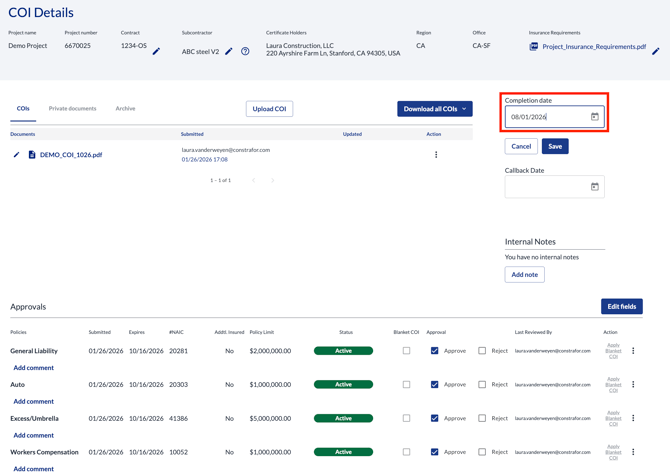
So what happens when you enter a date in this field and click "save"? This only applies to policies (coverage lines) that are in ACTIVE status.
- If a completion date is entered in the future (including today), the status will flip to "Scope completed" automatically at 11:59PM of the entered completion date.
- If the date is entered in the past (from yesterday), the status flips to "Scope completed" as soon as the date is entered.
In summary, you should use this field if you are trying to scope complete all coverage lines under the COI request, either at that moment (by entering a date in the past) or in the near future (by entering that specific date).
For more context on the "Scope Completed" status and what it does, please refer to this article: https://www.constrafor.com/knowledge/what-is-scope-completed-status
Thanks for reading!