![Logo white.png]](https://www.constrafor.com/hs-fs/hubfs/KB-ConstraConnect/Logos/Constrafor%20Logo%20-%20White/Logo%20white.png?height=40&name=Logo%20white.png)
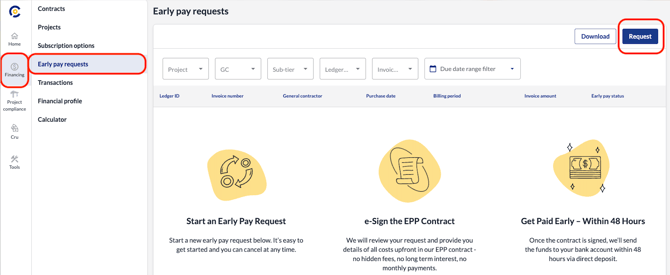
Log into your Constrafor account and navigate to the Financing section on the left-hand sidebar.
Then, click Early Pay Requests from the menu that appears just to the right of that sidebar and finally, click Request all the way of the right side of the page.
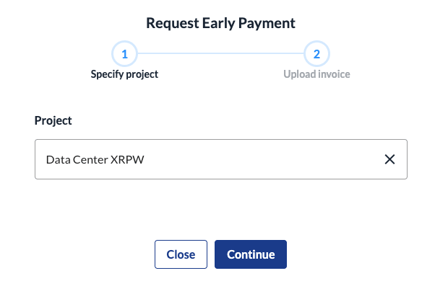
Next, select the project you are requesting payment for and click Continue.
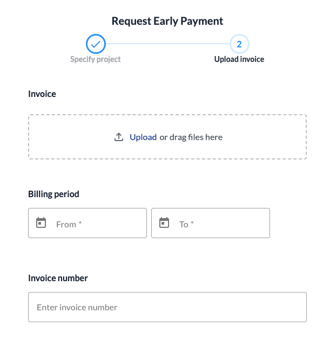
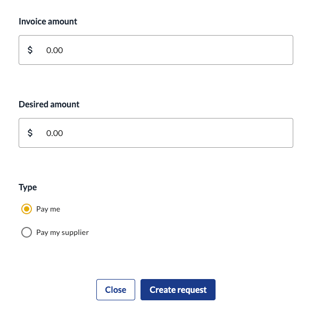
Upload a copy of your invoice and provide the following invoice information. Then click Create Request at the bottom of the page.
 .
.
For additional assistance, your Constrafor point of contact or our support team are here to help. You can reach us via phone at (650) 313-6165, email at support@constrafor.com, or through the chat feature within the portal