![Logo white.png]](https://www.constrafor.com/hs-fs/hubfs/KB-ConstraConnect/Logos/Constrafor%20Logo%20-%20White/Logo%20white.png?height=40&name=Logo%20white.png)
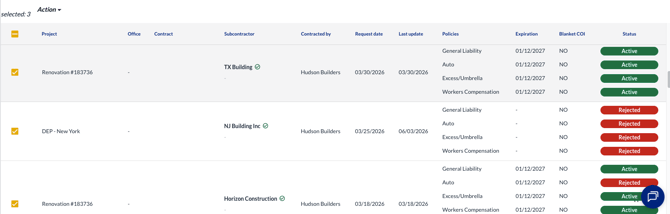
- Click the checkboxes on the left next to any/all requests you'd like to Scope Complete.
-
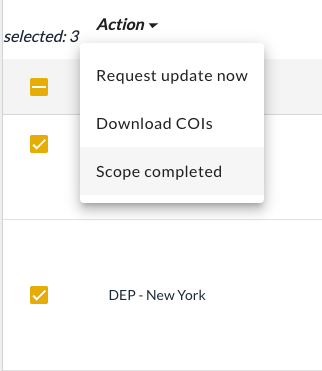
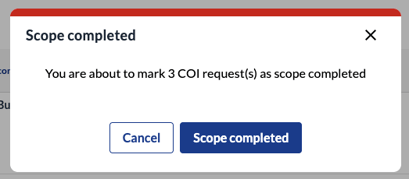
Click the Action button at the top and click Scope Complete. The platform will confirm you are scope completing the requests. Click Scope Completed again to finish.
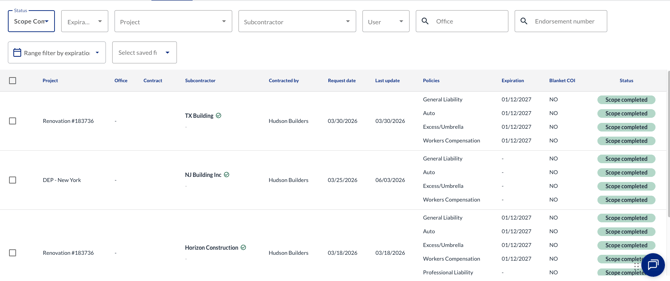
- Now, when you filter all requests by Scope Completed, you'll see the most recently scope completed requests at the top of the list.
Important Note on Scope Completing Blankets:
- You cannot Scope Complete a request if the project’s insurance program is set to "Blanket."
- You can Scope Complete project-specific requests that have a blanket applied. Doing this will automatically unapply the blanket.